 |
PingDD 1.1.1
PingDD is a cross-platform TCP “ping” tool written in C.
|
|
PingDD 1.1.1
PingDD is a cross-platform TCP “ping” tool written in C.
|
PingDD is a cross-platform TCP “ping” tool written in C.
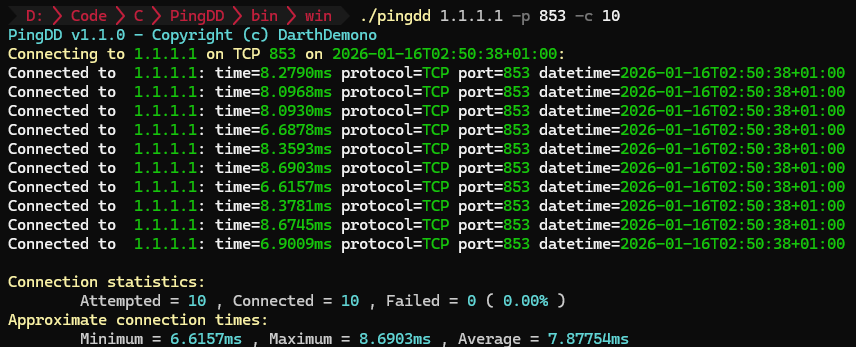
Instead of ICMP, it checks a specific TCP port and tells you whether it’s reachable, how fast the connection handshake completes, and (optionally) logs every attempt to CSV for later analysis. This tool is designed to help network administrators and enthusiasts test the availability and responsiveness on remote servers.
Classic ping answers one question: “Can I reach this host over ICMP?”
In real-world troubleshooting, the question is usually different:
PingDD is built to solve these issues: simple feedback with clean output, and an option to keep evidence (CSV + timestamps).
Download using Winget.
Winget installs PingDD and adds it to your PATH automatically.
Download the latest binary from the GitHub Releases page:
https://github.com/darthdemono/PingDD/releases
If your OS is not available in the release list, compile from source:
Then add the binary to your PATH:
| Option | Description | Required | Default |
|---|---|---|---|
<destination> | Target hostname or IP address | Yes | - |
-p, --port N | Set TCP port N | Yes | - |
-t, --timeout N | Timeout in milliseconds | No | 1000 |
-c, --count N | Number of checks | No | infinite |
-r, --rate N | Rate: 1 check per N ms (delay between checks) | No | 50ms |
--no-color | Disable color output | No | Colors enabled |
--csv | Enable CSV logging | No | Disabled |
-?, --help | Display help | No | - |
Check port 80 a hundred times:
Slow the rate to one check every 500ms:
Enable CSV logging:
When CSV logging is enabled, PingDD generates a timestamped filename and writes:
This makes it easy to graph results later, compare different networks, or keep records for debugging.
PingDD aims to keep the codebase straightforward and readable. The project leans toward predictable behavior, clean output, and portability—so changes that improve reliability and cross-platform correctness are preferred over “clever” complexity.
"An idiot admires complexity, a genius admires simplicity" - Terry A. Davis
Contributions are welcome.
MIT License. See LICENSE
 1.9.8
1.9.8